Профессиональный SOCKS5(h) & HTTP IPv6 прокси-сервер
Разверните собственный высокопроизводительный IPv6 прокси-сервер с умной ротацией, балансировкой нагрузки и управлением через API. Генерируйте миллионы учетных записей.
Возможности сервера
Всё необходимое для построения надёжного прокси-сервера
SOCKS5(h) & HTTP
Полная поддержка протоколов SOCKS5(h) с защитой от DNS-утечек, а также HTTP CONNECT. Режим Hybrid позволяет одновременно принимать разные протоколы на одном порту.
Мультипрофильный p0f
Все p0f-отпечатки (Windows, macOS, мобильные) доступны одновременно на разных портах. Маршрутизируйте трафик через нужную ОС без перезагрузок и смены профилей.
UDP
UDP через SOCKS5 (UDP ASSOCIATE): через него может идти и трафик QUIC (HTTP/3).
Мультисеть
Гибкая балансировка исходящего трафика между множеством IPv6 подсетей с настройкой приоритетов (весов).
"Ленивая" ротация
Смена IP происходит только при новой авторизации. Активные сессии (Sticky Sessions) не разрываются.
Отказоустойчивый DNS
Встроенный резолвер с поддержкой балансировки и автоматическим переключением на резервные DNS при сбоях.
Удобное API
HTTP API для мгновенного получения учётных записей, статистики и графического дашборда в реальном времени.
Управление доступом
Настройка белых и черных списков (blacklist) для мощной фильтрации трафика и блокировки доменов или IP-адресов.
Лимитер скорости
Встроенный лимитер скорости с поддержкой burst-нагрузок. Защищает сервер от исчерпания канала и обеспечивает стабильность всех соединений.
MITM-режим: отпечаток настоящего браузера
Трафик на уровне TLS и HTTP выглядит как настоящий Chrome, Firefox или Safari
Сетевой отпечаток браузера
MITM-профиль воспроизводит отпечаток настоящего Chrome, Firefox и Safari по всем слоям: JA4 (со всеми составляющими), HTTP/2 и Akamai. Набор и порядок заголовков — как у реального браузера.
Собственный CA
Сервер терминирует TLS собственным удостоверяющим центром. Клиент один раз доверяет CA (скачивается с сервера) — и весь HTTPS идёт под профилем выбранного браузера.
Один порт — все ОС
Отдельный MITM-порт обслуживает все ОС сразу — Windows, macOS, Linux, мобильные: профиль подбирается автоматически под браузер клиента. Аккаунты, QoS и ротация IPv6 — общие с основным режимом.
Архитектура решения
Как OxidProxy маршрутизирует трафик
OxidProxy устанавливается на ваш сервер (VPS/Dedicated) и выступает в роли шлюза. Он принимает подключения от вашего софта по IPv4, авторизует их, разрешает DNS-запросы (через встроенный резолвер) и направляет трафик через одну из подключенных IPv6 подсетей согласно настроенным весам.
Стоимость лицензии
Оплата за экземпляр ПО
Месячная подписка
- 1 лицензия на сервер
- Все функции включены
- Обновления ПО
Годовая подписка
- 1 лицензия на сервер
- Экономия $110 в год
- Все функции включены
- Обновления ПО
* Цены указаны в USD. Оплата производится в рублях по курсу ЦБ РФ на день оплаты.
Загрузка
Получить актуальную версию сервера
Платформа: Debian 12 и 13 (x64)
curl -fsSL https://oxidproxy.com/downloads/install.sh | bash
Ставите с помощью ИИ-агента? Отдайте ему эту инструкцию — он спросит, что ему нужно, и настроит сервер сам.
Ручная установка
| Пакет | Версия | MD5 | Размер |
|---|---|---|---|
| OxidProxy | … | … | … |
| Ядро (p0f) | … | … | … |
| Заголовки ядра | … | … | … |
История изменений
Показать ▼- [CHG] Ограничение скорости экономнее — когда клиенты пытаются передать больше лимита (
shaping), сервер тратит на это в разы меньше процессора, и нагрузка больше не растёт с числом таких соединений.
Конфигурация
Полный контроль через config.yaml Показать ▼
# ==========================================
# OxidProxy Configuration File
# Doc:     https://oxidproxy.com/downloads/Readme.txt
# Support: support@oxidproxy.com
#          https://t.me/OxidProxy_com
# ==========================================

# ------------------------------------------
# 1. General settings and licensing
# ------------------------------------------

# [!!! IMPORTANT !!!] Your license key
license_key: "PUT_YOUR_KEY_HERE"

# Additional license servers. NOT required: the regular endpoints are built
# into the server itself, across two independently registered domains, and
# each endpoint is reachable on more than one port, so a provider blocking
# one of them does not cut you off.
#
# Fill this in only if support gives you a specific address, for example if
# the usual endpoints become unreachable from your network. Entries here are
# tried BEFORE the built-in ones, so a working address takes effect at once.
#
# license_servers:
#   - "backup.example.com:8000"

# ------------------------------------------
# DASHBOARD BRANDING (optional)
# ------------------------------------------
# Replaces the mark in the web dashboard with your own. Leave the section
# out entirely and the panel carries ours.
#
# The name is split in two because the logo is two-toned: the second half
# is painted in the theme's accent color. Leave `accent` empty for a
# single-color wordmark.
#
# `url` is where the logo points; an empty value drops the link. Only
# http:// and https:// are accepted.
#
# The full name (name + accent) also names the certificates the server
# creates from now on (the MITM CA, the HTTPS API certificate) and the CA
# file downloaded from GET /ca. Certificates that already exist keep their
# names: a renamed CA is a new CA, and every client would install it again.
#
# brand:
#   name:   "Acme"
#   accent: "Proxy"
#   url:    "https://acme.example"

# IPv4 address to accept incoming connections on (0.0.0.0 = all addresses).
# IPv6 is not accepted here: clients connect over IPv4.
listen_ip: "0.0.0.0"

# [!!! IMPORTANT !!!] Public IPv4 address of this server.
# Used to build connection strings and API responses.
public_ip: "YOUR_EXTERNAL_IPV4"

# External network interface for kernel-level QoS (per-profile latency).
# Left commented out, the interface is detected automatically via the
# default gateway.
# ext_iface: "eth0"

# Ports and OS profiles.
#   os_preset  windows | macos | ios | android | linux
#   mode       socks (default) | http | hybrid (SOCKS5 and HTTP CONNECT on one port)
# The preset sets everything else to match the device. A port may override
# it with tcp_congestion, tcp_window_size, latency_base_ms or tos; leave them
# out to keep the preset's values (tos is auto: each outgoing address gets its
# own value, as real devices differ). latency_base_ms applies per profile, not
# per port: give every port of one os_preset the same value. Every key and its
# default: the Doc link above (Readme.txt) and the user guide, section 5.3.
# Use ports 1024 and above: the service runs as user oxidproxy and cannot open
# a lower one.
listeners:
  - port: 1080
    os_preset: "linux"
    # mode: "socks"

  - port: 1081
    os_preset: "android"
    mode: "hybrid"

  - port: 1082
    os_preset: "windows"
    mode: "hybrid"

  - port: 1083
    os_preset: "ios"
    mode: "hybrid"

  - port: 1084
    os_preset: "macos"
    mode: "hybrid"

# MITM ports: the server terminates client TLS with its own CA and rebuilds
# the request to the target with the network fingerprint of a real browser.
# The profile is picked automatically from the client User-Agent, so a single
# port serves every OS and browser.
#
# Profiles are named <os>-<browser>:
#   windows-chrome, windows-firefox, windows-edge
#   macos-chrome,   macos-firefox,   macos-safari
#   linux-chrome,   linux-firefox
#   android-chrome, android-firefox
#   ios-safari
#
# The client must trust the server CA once (download it from GET /ca),
# otherwise the browser reports a certificate error.
#
# mitm_listeners:
#   - port: 9443
#     mode: "hybrid"             # socks (default) / http / hybrid
#     profiles:
#       - "windows-chrome"
#       - "windows-firefox"
#       - "macos-safari"
#       - "android-chrome"
#       - "ios-safari"
#     default: "windows-chrome"  # used when no listed profile matches the client's OS
#     # strict: false            # true = refuse instead of substituting anything
#     # allow_unknown_ua: false  # true = also serve clients with no browser UA
#
# A client with no recognizable browser User-Agent (curl, a script) is refused
# with a short HTML page: there is no browser to emulate, and forwarding it
# under someone else's fingerprint helps nobody. Set allow_unknown_ua: true to
# restore the old behavior and route such clients through `default`.


# ------------------------------------------
# 2. IPv6 settings and rotation
# ------------------------------------------

# [!!! IMPORTANT !!!] IPv6 subnets used for outgoing traffic.
# weight: the higher the number, the more often the subnet is used.
ipv6_subnets:
  - cidr: "2a01:xxxx::/32"
    weight: 427
  # Example of a second subnet (remove the # to enable):
  # - cidr: "2a02:yyyy:yyyy:yyyy::/64"
  #   weight: 16

# Rotation interval, in minutes.
# 0 = disabled (the IP stays the same until restart).
# "Lazy rotation" is used: the IP changes when the user authenticates
# again, and active connections are NOT dropped.
rotation_interval: 0


# ------------------------------------------
# 3. API and user management
# ------------------------------------------

# Port for API commands (creating users, statistics)
api_port: 8080
# [RECOMMENDED] Port for the secured API (HTTPS)
api_port_https: 8443

# [!!! IMPORTANT !!!] Secret token for API access. Minimum 12 characters.
master_token: "change_me_to_secure_token"

# Maximum number of unique generated accounts
max_accounts: 100000

# Where to store generated accounts.
# The variables [port], [os] and [mode] split the output by port, OS and
# protocol. Hybrid listeners produce two files: one with socks5:// links
# and one with http:// links.
# If more than one file will be produced, ALL THREE variables are required
# or the server refuses to start.
accounts_file: "/var/lib/oxidproxy/accounts_[os]_[mode]_[port].txt"

# Seed for account generation. Logins and passwords are derived from it,
# so they stay the same across restarts, and every value yields its own
# fixed set of credentials. The installer replaces the number below with a
# random one on a fresh install; if you copy this file to another server,
# give that server its own value. Accepts values from 0 to 2^64 - 1.
# Changing the seed regenerates all accounts.
account_seed: 123456789


# ------------------------------------------
# 4. DNS resolver
# ------------------------------------------
# Supports weighted balancing and failover servers.
# RECOMMENDED: add your hosting provider's DNS as a primary server
# (weight > 0). You can usually find them in /etc/resolv.conf.

dns:
  # Timeout for a single server's answer, seconds. This is not what the user
  # waits: after 300 ms a failover server (one without a weight) is queried
  # in parallel, and the first answer wins. What this value decides is how quickly a
  # server that went quiet is noticed and taken out of rotation, so keep it
  # short. Raise it to 2 only if healthy servers are being marked down.
  timeout: 1
  cache_size: 8000  # number of cached DNS records

  # Do not log a warning when a domain has no IPv6 (AAAA) record.
  suppress_aaaa_not_found: true

  servers:
    # === Primary servers (weighted) ===
    # When weight is set, traffic is distributed between them.
    - address: "[2606:4700:4700::1111]:53" # Cloudflare IPv6
      weight: 58
    - address: "1.1.1.1:53"
      weight: 7
    # Example of a local provider DNS (recommended):
    # - address: "10.0.0.53:53"
    #   weight: 1000

    # === Failover servers ===
    # Queried when a primary server is down, or in parallel when it has not
    # answered within 300 ms.
    # Failover servers have no weight parameter.
    - address: "[2620:fe::fe]:53"          # Quad9 IPv6
    - address: "9.9.9.9:53"                # Quad9


# ------------------------------------------
# 5. Traffic shaping and tuning
# ------------------------------------------
# Limits the TOTAL bandwidth of the server (all users combined).

shaping:
  # Rate in bytes per second (0 = unlimited)
  # Cheat sheet:
  #   1 Mbit/s   = 125000
  #   10 Mbit/s  = 1250000
  #   100 Mbit/s = 12500000
  rate: 0

  # Burst, in bytes.
  # Allows briefly exceeding the rate limit so small files load instantly.
  # Recommended: rate * 2.
  # 0 = one second of rate.
  # A value below 65536 is raised to 65536 (or to rate, if rate is lower).
  # Ignored when rate is 0 (unlimited).
  burst: 0


# ------------------------------------------
# 6. Connection timeouts
# ------------------------------------------
timeouts:
  # How long (seconds) to wait for active connections to finish when the
  # server is stopped or restarted. Keep it under 85: systemd kills the
  # service if it is still running 90 seconds after the stop request.
  shutdown: 10
  # Maximum idle time (seconds) of a TCP/UDP session before it is closed
  idle: 300

# ------------------------------------------
# 7. Monitoring and logs
# ------------------------------------------

# File listing blocked domains and IP addresses
blocked_file: "/etc/oxidproxy/blacklist.txt"

# Service account, intended for checkers and monitoring.
# It can reach only the domain listed below.
service_account:
  enabled: true
  login: "checker"
  password: "strong_password"
  allowed_domain: "ifconfig.me"

log:
  # Where the log goes. With `dir` left commented out, the server logs only
  # to the systemd journal (journalctl -u oxidproxy), which rotates and caps
  # itself. Uncomment `dir` to also keep files on disk: under load the log
  # grows by gigabytes a day, and the package rotates the files every hour,
  # keeping three - only in /var/log/oxidproxy. Files in another directory
  # are not rotated.
  # dir: "/var/log/oxidproxy"
  level: "info" # one of: debug, info, warn, error
HTTP API
Интеграция и мониторинг
# SOCKS5 (по умолчанию)
/allocate?token=TOKEN&os=android
→ socks5://user123:pass456@1.2.3.4:1081

# HTTP CONNECT
/allocate?token=TOKEN&os=android&mode=http
→ http://user123:pass456@1.2.3.4:1081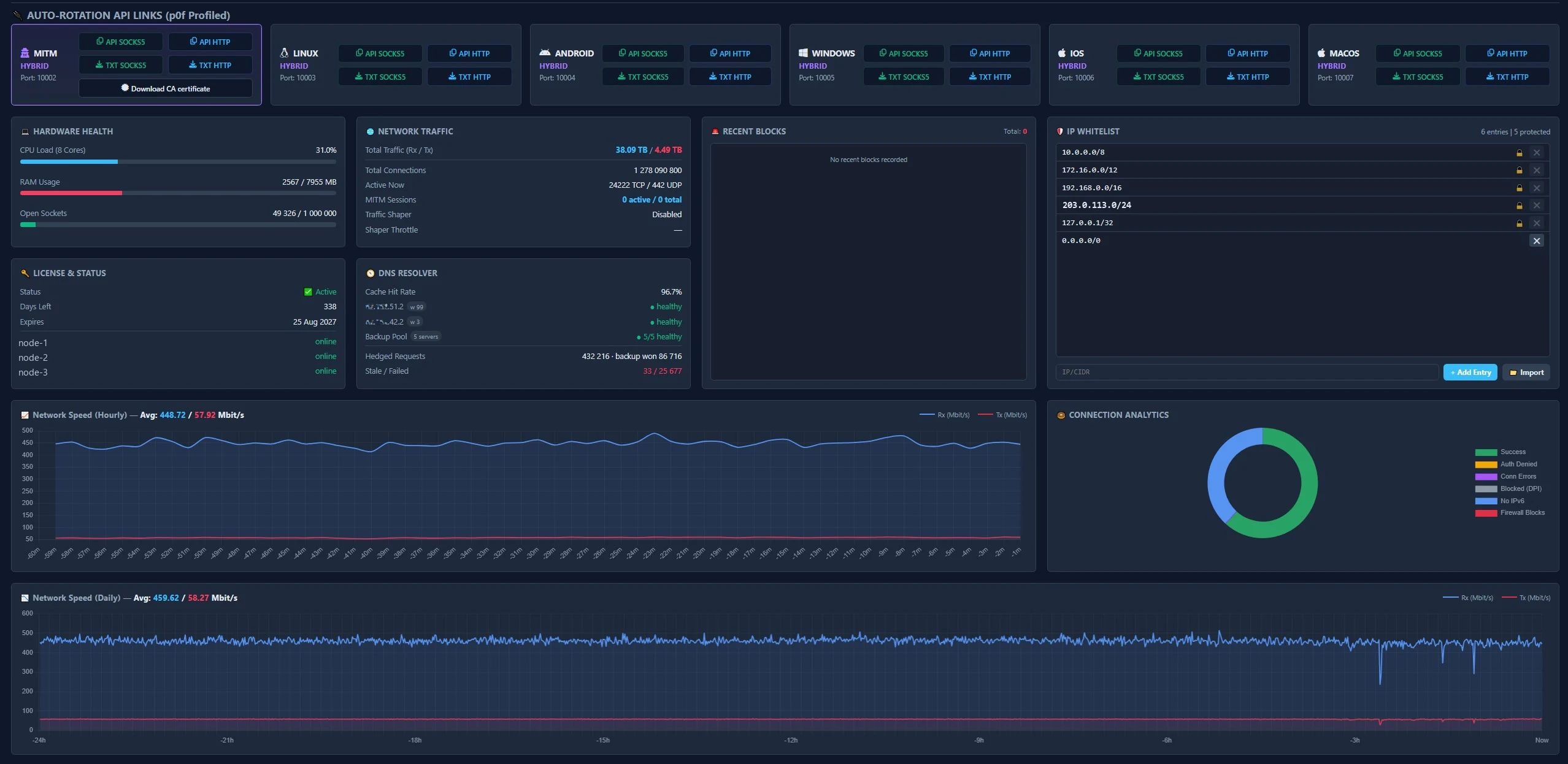
uptime_seconds: 9980,
active_connections:
  tcp: 56,
  udp: 4
traffic:
  ingress_bytes: 264074969,
  egress_bytes: 35524983
dns:
  total_queries: 18905,
  cache_hits: 17106,
  cache_misses: 1799,
  cache_entries: 1420
events:
  total_connections: 18963,
  connection_errors: 12,
  access_denied: 0,
  blocked_domains: 0
license:
  expires_at_unix: 1770484105,
  days_left: 29,
  servers:
    node-1: "online",
    node-2: "online",
    node-3: "online"
Ответы на частые вопросы
Что такое MITM-режим?
В MITM-режиме сервер терминирует TLS собственным сертификатом и заново собирает запрос к целевому сайту с сетевым отпечатком настоящего браузера — Chrome, Firefox или Safari (JA4, HTTP/2, Akamai). Профиль выбирается по User-Agent клиента, поэтому один порт обслуживает все ОС. Обычные SOCKS5/HTTP-листенеры при этом продолжают работать как прежде.
Нужно ли устанавливать сертификат для MITM-режима?
Да. Так как TLS терминируется собственным удостоверяющим центром (CA), клиент должен один раз добавить сертификат CA в доверенные — иначе браузер покажет ошибку сертификата. Сертификат скачивается с сервера: в дашборде есть карточка MITM с кнопкой скачивания. Для обычных SOCKS5/HTTP-режимов сертификат не нужен.
Почему поддерживаются только Debian 12 и 13?
Для обеспечения максимальной стабильности, производительности и поддержки подмены отпечатков (p0f) используется специально скомпилированное кастомное ядро Linux. Оно собрано и протестировано под Debian 12 (Bookworm) и Debian 13 (Trixie), подходящее ядро установщик выбирает сам.
Почему не запускается прокси после правки конфига?
Проверьте корректность конфига командой oxidproxy -t /etc/oxidproxy/config.yaml. Если в нём ошибка, скопируйте весь конфиг и проверьте его валидатором.
Почему не открываются некоторые сайты?
OxidProxy поддерживает проксирование только к сайтам с поддержкой IPv6. Убедитесь, что целевой ресурс доступен по IPv6.
Почему IP не меняется при каждом запросе?
OxidProxy использует "Sticky Session". IP привязан к сессии. Чтобы получить новый IP, нужно
переподключиться после истечения rotation_interval или запросить новый
доступ через API.
Сколько учётных записей можно сгенерировать?
Поддерживается генерация от одной до нескольких миллионов учётных записей, каждая со своим уникальным IP.
Какой шаг ограничения скорости?
Скорость можно ограничивать с шагом в 1 байт/с. Также можно прописать параметры burst-режима, измеряемого в байтах.
Могу ли я запретить доступ к некоторым сайтам?
Да. Для этого предусмотрен специальный файл blacklist.txt, в котором можно указать домены, IP-адреса и сети, доступ к которым вы хотите запретить.
Поддерживается ли HTTP-прокси?
Да. Поддерживается режим HTTP CONNECT для браузеров, curl и системных настроек
прокси. Режим hybrid позволяет принимать оба протокола на одном порту
— протокол определяется автоматически. Все функции (p0f, DNS, лимитер) работают
одинаково для обоих протоколов.