Professional SOCKS5(h) & HTTP IPv6 proxy server
Run your own high-performance IPv6 proxy server with smart rotation, load balancing and API control. Generate millions of accounts.
What the server does
Everything needed to run a dependable proxy
SOCKS5(h) & HTTP
Full SOCKS5(h) support with DNS leak protection, plus HTTP CONNECT. Hybrid mode accepts both protocols on a single port at once.
Multi-profile p0f
Every p0f fingerprint — Windows, macOS, mobile — is available at once on separate ports. Route traffic through the OS you need without restarts or profile switching.
UDP
UDP through SOCKS5 (UDP ASSOCIATE): QUIC (HTTP/3) traffic can pass through it too.
Multiple subnets
Flexible balancing of outbound traffic across many IPv6 subnets with configurable weights.
Lazy rotation
The IP changes only on re-authentication. Active sticky sessions are never interrupted.
Smart DNS failover
Built-in resolver with balancing and automatic failover to backup DNS servers.
A practical API
HTTP API for instant credential generation, statistics and a live graphical dashboard.
Access control
Allow and block lists for precise traffic filtering, blocking whole domains or IP addresses.
Traffic shaping
Built-in rate limiter with burst support. Keeps a single tenant from saturating the link and keeps every connection stable.
MITM mode: the fingerprint of a real browser
At the TLS and HTTP layers the traffic looks like genuine Chrome, Firefox or Safari
Browser network fingerprint
The MITM profile reproduces the fingerprint of a real Chrome, Firefox or Safari across every layer: JA4 in full, HTTP/2 and Akamai. Header set and header order match the real browser.
Your own CA
The server terminates TLS with its own certificate authority. The client trusts that CA once — it is downloaded from the server — and from then on all HTTPS traffic carries the chosen browser profile.
One port, every OS
A single MITM port serves every OS at once — Windows, macOS, Linux, mobile — picking the profile automatically from the client browser. Accounts, QoS and IPv6 rotation are shared with the regular modes.
How it is put together
How OxidProxy routes traffic
OxidProxy is installed on your own server, VPS or dedicated, and acts as a gateway. It accepts connections from your software over IPv4, authenticates them, resolves DNS through its built-in resolver, and sends the traffic out through one of the attached IPv6 subnets according to the configured weights.
License pricing
Priced per server instance
Annual
- One license per server
- Saves $110 a year
- Every feature included
- Software updates
* Prices are in USD.
Download
Get the current release
Platform: Debian 12 and 13 (x64)
curl -fsSL https://oxidproxy.com/downloads/install.sh | bash
Deploying with an AI agent? Hand it this instruction — it will ask what it needs and set the server up itself.
Manual installation
| Package | Version | MD5 | Size |
|---|---|---|---|
| OxidProxy | … | … | … |
| Kernel (p0f) | … | … | … |
| Headers | … | … | … |
Changelog
Show ▼- [CHG] More efficient bandwidth limiting — when clients try to transfer more than the limit (
shaping), the server uses many times less CPU on it, and the load no longer grows with the number of such connections.
Configuration
Full control through config.yaml Show ▼
# ==========================================
# OxidProxy Configuration File
# Doc:     https://oxidproxy.com/downloads/Readme.txt
# Support: support@oxidproxy.com
#          https://t.me/OxidProxy_com
# ==========================================

# ------------------------------------------
# 1. General settings and licensing
# ------------------------------------------

# [!!! IMPORTANT !!!] Your license key
license_key: "PUT_YOUR_KEY_HERE"

# Additional license servers. NOT required: the regular endpoints are built
# into the server itself, across two independently registered domains, and
# each endpoint is reachable on more than one port, so a provider blocking
# one of them does not cut you off.
#
# Fill this in only if support gives you a specific address, for example if
# the usual endpoints become unreachable from your network. Entries here are
# tried BEFORE the built-in ones, so a working address takes effect at once.
#
# license_servers:
#   - "backup.example.com:8000"

# ------------------------------------------
# DASHBOARD BRANDING (optional)
# ------------------------------------------
# Replaces the mark in the web dashboard with your own. Leave the section
# out entirely and the panel carries ours.
#
# The name is split in two because the logo is two-toned: the second half
# is painted in the theme's accent color. Leave `accent` empty for a
# single-color wordmark.
#
# `url` is where the logo points; an empty value drops the link. Only
# http:// and https:// are accepted.
#
# The full name (name + accent) also names the certificates the server
# creates from now on (the MITM CA, the HTTPS API certificate) and the CA
# file downloaded from GET /ca. Certificates that already exist keep their
# names: a renamed CA is a new CA, and every client would install it again.
#
# brand:
#   name:   "Acme"
#   accent: "Proxy"
#   url:    "https://acme.example"

# IPv4 address to accept incoming connections on (0.0.0.0 = all addresses).
# IPv6 is not accepted here: clients connect over IPv4.
listen_ip: "0.0.0.0"

# [!!! IMPORTANT !!!] Public IPv4 address of this server.
# Used to build connection strings and API responses.
public_ip: "YOUR_EXTERNAL_IPV4"

# External network interface for kernel-level QoS (per-profile latency).
# Left commented out, the interface is detected automatically via the
# default gateway.
# ext_iface: "eth0"

# Ports and OS profiles.
#   os_preset  windows | macos | ios | android | linux
#   mode       socks (default) | http | hybrid (SOCKS5 and HTTP CONNECT on one port)
# The preset sets everything else to match the device. A port may override
# it with tcp_congestion, tcp_window_size, latency_base_ms or tos; leave them
# out to keep the preset's values (tos is auto: each outgoing address gets its
# own value, as real devices differ). latency_base_ms applies per profile, not
# per port: give every port of one os_preset the same value. Every key and its
# default: the Doc link above (Readme.txt) and the user guide, section 5.3.
# Use ports 1024 and above: the service runs as user oxidproxy and cannot open
# a lower one.
listeners:
  - port: 1080
    os_preset: "linux"
    # mode: "socks"

  - port: 1081
    os_preset: "android"
    mode: "hybrid"

  - port: 1082
    os_preset: "windows"
    mode: "hybrid"

  - port: 1083
    os_preset: "ios"
    mode: "hybrid"

  - port: 1084
    os_preset: "macos"
    mode: "hybrid"

# MITM ports: the server terminates client TLS with its own CA and rebuilds
# the request to the target with the network fingerprint of a real browser.
# The profile is picked automatically from the client User-Agent, so a single
# port serves every OS and browser.
#
# Profiles are named <os>-<browser>:
#   windows-chrome, windows-firefox, windows-edge
#   macos-chrome,   macos-firefox,   macos-safari
#   linux-chrome,   linux-firefox
#   android-chrome, android-firefox
#   ios-safari
#
# The client must trust the server CA once (download it from GET /ca),
# otherwise the browser reports a certificate error.
#
# mitm_listeners:
#   - port: 9443
#     mode: "hybrid"             # socks (default) / http / hybrid
#     profiles:
#       - "windows-chrome"
#       - "windows-firefox"
#       - "macos-safari"
#       - "android-chrome"
#       - "ios-safari"
#     default: "windows-chrome"  # used when no listed profile matches the client's OS
#     # strict: false            # true = refuse instead of substituting anything
#     # allow_unknown_ua: false  # true = also serve clients with no browser UA
#
# A client with no recognizable browser User-Agent (curl, a script) is refused
# with a short HTML page: there is no browser to emulate, and forwarding it
# under someone else's fingerprint helps nobody. Set allow_unknown_ua: true to
# restore the old behavior and route such clients through `default`.


# ------------------------------------------
# 2. IPv6 settings and rotation
# ------------------------------------------

# [!!! IMPORTANT !!!] IPv6 subnets used for outgoing traffic.
# weight: the higher the number, the more often the subnet is used.
ipv6_subnets:
  - cidr: "2a01:xxxx::/32"
    weight: 427
  # Example of a second subnet (remove the # to enable):
  # - cidr: "2a02:yyyy:yyyy:yyyy::/64"
  #   weight: 16

# Rotation interval, in minutes.
# 0 = disabled (the IP stays the same until restart).
# "Lazy rotation" is used: the IP changes when the user authenticates
# again, and active connections are NOT dropped.
rotation_interval: 0


# ------------------------------------------
# 3. API and user management
# ------------------------------------------

# Port for API commands (creating users, statistics)
api_port: 8080
# [RECOMMENDED] Port for the secured API (HTTPS)
api_port_https: 8443

# [!!! IMPORTANT !!!] Secret token for API access. Minimum 12 characters.
master_token: "change_me_to_secure_token"

# Maximum number of unique generated accounts
max_accounts: 100000

# Where to store generated accounts.
# The variables [port], [os] and [mode] split the output by port, OS and
# protocol. Hybrid listeners produce two files: one with socks5:// links
# and one with http:// links.
# If more than one file will be produced, ALL THREE variables are required
# or the server refuses to start.
accounts_file: "/var/lib/oxidproxy/accounts_[os]_[mode]_[port].txt"

# Seed for account generation. Logins and passwords are derived from it,
# so they stay the same across restarts, and every value yields its own
# fixed set of credentials. The installer replaces the number below with a
# random one on a fresh install; if you copy this file to another server,
# give that server its own value. Accepts values from 0 to 2^64 - 1.
# Changing the seed regenerates all accounts.
account_seed: 123456789


# ------------------------------------------
# 4. DNS resolver
# ------------------------------------------
# Supports weighted balancing and failover servers.
# RECOMMENDED: add your hosting provider's DNS as a primary server
# (weight > 0). You can usually find them in /etc/resolv.conf.

dns:
  # Timeout for a single server's answer, seconds. This is not what the user
  # waits: after 300 ms a failover server (one without a weight) is queried
  # in parallel, and the first answer wins. What this value decides is how quickly a
  # server that went quiet is noticed and taken out of rotation, so keep it
  # short. Raise it to 2 only if healthy servers are being marked down.
  timeout: 1
  cache_size: 8000  # number of cached DNS records

  # Do not log a warning when a domain has no IPv6 (AAAA) record.
  suppress_aaaa_not_found: true

  servers:
    # === Primary servers (weighted) ===
    # When weight is set, traffic is distributed between them.
    - address: "[2606:4700:4700::1111]:53" # Cloudflare IPv6
      weight: 58
    - address: "1.1.1.1:53"
      weight: 7
    # Example of a local provider DNS (recommended):
    # - address: "10.0.0.53:53"
    #   weight: 1000

    # === Failover servers ===
    # Queried when a primary server is down, or in parallel when it has not
    # answered within 300 ms.
    # Failover servers have no weight parameter.
    - address: "[2620:fe::fe]:53"          # Quad9 IPv6
    - address: "9.9.9.9:53"                # Quad9


# ------------------------------------------
# 5. Traffic shaping and tuning
# ------------------------------------------
# Limits the TOTAL bandwidth of the server (all users combined).

shaping:
  # Rate in bytes per second (0 = unlimited)
  # Cheat sheet:
  #   1 Mbit/s   = 125000
  #   10 Mbit/s  = 1250000
  #   100 Mbit/s = 12500000
  rate: 0

  # Burst, in bytes.
  # Allows briefly exceeding the rate limit so small files load instantly.
  # Recommended: rate * 2.
  # 0 = one second of rate.
  # A value below 65536 is raised to 65536 (or to rate, if rate is lower).
  # Ignored when rate is 0 (unlimited).
  burst: 0


# ------------------------------------------
# 6. Connection timeouts
# ------------------------------------------
timeouts:
  # How long (seconds) to wait for active connections to finish when the
  # server is stopped or restarted. Keep it under 85: systemd kills the
  # service if it is still running 90 seconds after the stop request.
  shutdown: 10
  # Maximum idle time (seconds) of a TCP/UDP session before it is closed
  idle: 300

# ------------------------------------------
# 7. Monitoring and logs
# ------------------------------------------

# File listing blocked domains and IP addresses
blocked_file: "/etc/oxidproxy/blacklist.txt"

# Service account, intended for checkers and monitoring.
# It can reach only the domain listed below.
service_account:
  enabled: true
  login: "checker"
  password: "strong_password"
  allowed_domain: "ifconfig.me"

log:
  # Where the log goes. With `dir` left commented out, the server logs only
  # to the systemd journal (journalctl -u oxidproxy), which rotates and caps
  # itself. Uncomment `dir` to also keep files on disk: under load the log
  # grows by gigabytes a day, and the package rotates the files every hour,
  # keeping three - only in /var/log/oxidproxy. Files in another directory
  # are not rotated.
  # dir: "/var/log/oxidproxy"
  level: "info" # one of: debug, info, warn, error
HTTP API
Integration and monitoring
# SOCKS5 (default)
/allocate?token=TOKEN&os=android
→ socks5://user123:pass456@1.2.3.4:1081

# HTTP CONNECT
/allocate?token=TOKEN&os=android&mode=http
→ http://user123:pass456@1.2.3.4:1081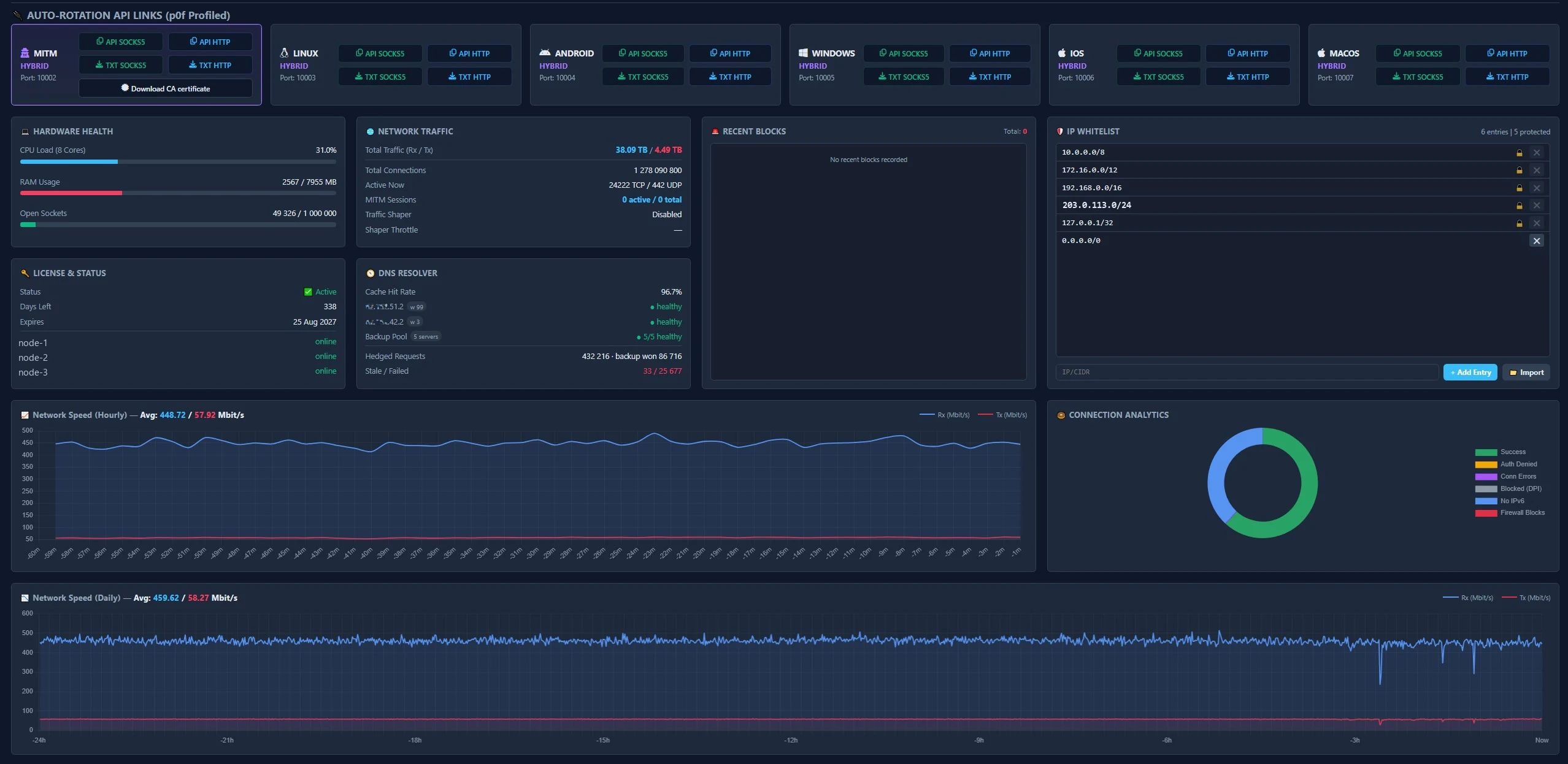
uptime_seconds: 9980,
active_connections:
  tcp: 56,
  udp: 4
traffic:
  ingress_bytes: 264074969,
  egress_bytes: 35524983
dns:
  total_queries: 18905,
  cache_hits: 17106,
  cache_misses: 1799,
  cache_entries: 1420
events:
  total_connections: 18963,
  connection_errors: 12,
  access_denied: 0,
  blocked_domains: 0
license:
  expires_at_unix: 1770484105,
  days_left: 29,
  servers:
    node-1: "online",
    node-2: "online",
    node-3: "online"
Frequently asked questions
What is MITM mode?
In MITM mode the server terminates TLS with its own certificate and rebuilds the request to the target site with the network fingerprint of a real browser — Chrome, Firefox or Safari (JA4, HTTP/2, Akamai). The profile is selected from the client User-Agent, so a single port serves every OS. Regular SOCKS5 and HTTP listeners keep working exactly as before.
Do I need to install a certificate for MITM mode?
Yes. Because TLS is terminated with the server's own certificate authority, the client has to add the CA certificate to its trust store once — otherwise the browser reports a certificate error. The dashboard has a MITM card with a download button. Plain SOCKS5 and HTTP modes need no certificate.
Why are only Debian 12 and 13 supported?
OS fingerprint substitution (p0f) relies on a purpose-built custom Linux kernel, which is what makes the stability and performance possible. It is compiled and tested for Debian 12 (Bookworm) and Debian 13 (Trixie); the installer picks the matching kernel by itself.
The proxy will not start after I edited the config
Check the config with oxidproxy -t /etc/oxidproxy/config.yaml. If it reports an error, copy the whole file and run it through the validator.
Why do some sites fail to open?
OxidProxy proxies over IPv6 only. Make sure the target site is reachable over IPv6, that is, has an AAAA record.
Why does the IP not change on every request?
Sessions are sticky: the IP is bound to the session. To get a new one,
reconnect after rotation_interval has elapsed, or request fresh
credentials through the API.
How many accounts can be generated?
Anywhere from one to several million accounts, each with its own unique IP.
What is the granularity of the speed limit?
The rate can be set with a granularity of 1 B/s. A burst allowance, measured in bytes, can be configured as well.
Can I block access to certain sites?
Yes. The blacklist.txt file takes domains, IP addresses and networks that should be unreachable.
Is an HTTP proxy supported?
Yes. HTTP CONNECT is supported for browsers, curl and system proxy
settings. hybrid mode accepts both protocols on a single port,
detecting which is in use automatically. Every feature — p0f, DNS, shaping —
behaves identically for both.